1. Introduction
If you’ve ever seen code like this:
console.log("Start");

setTimeout(() => {
  console.log("Timer");
}, 0);

console.log("End");
and wondered why the output is:
Start
End
Timer
then you’ve already encountered the JavaScript event loop.
Understanding the event loop is one of the most important concepts in JavaScript because it explains how asynchronous programming works behind the scenes.
In this guide, we’ll explore:
- Why JavaScript is single-threaded
- How asynchronous code works
- The relationship between the call stack and queues
- Promises and async/await
- Browser APIs and Node.js internals
- Real-world execution flow
By the end, you’ll have a solid mental model of how JavaScript actually works.
2. Is JavaScript Single Threaded?
One of the most common questions developers ask is:
Is JavaScript single threaded?
Yes.
JavaScript has only one call stack, which means it executes one task at a time.
Example:
console.log("A");
console.log("B");
console.log("C");
Output:
A
B
C
Everything executes sequentially.
But then another question appears:
If JavaScript is single-threaded, how can it perform API calls, timers, and file operations without blocking the entire application?
The answer lies in the runtime environment and the event loop.
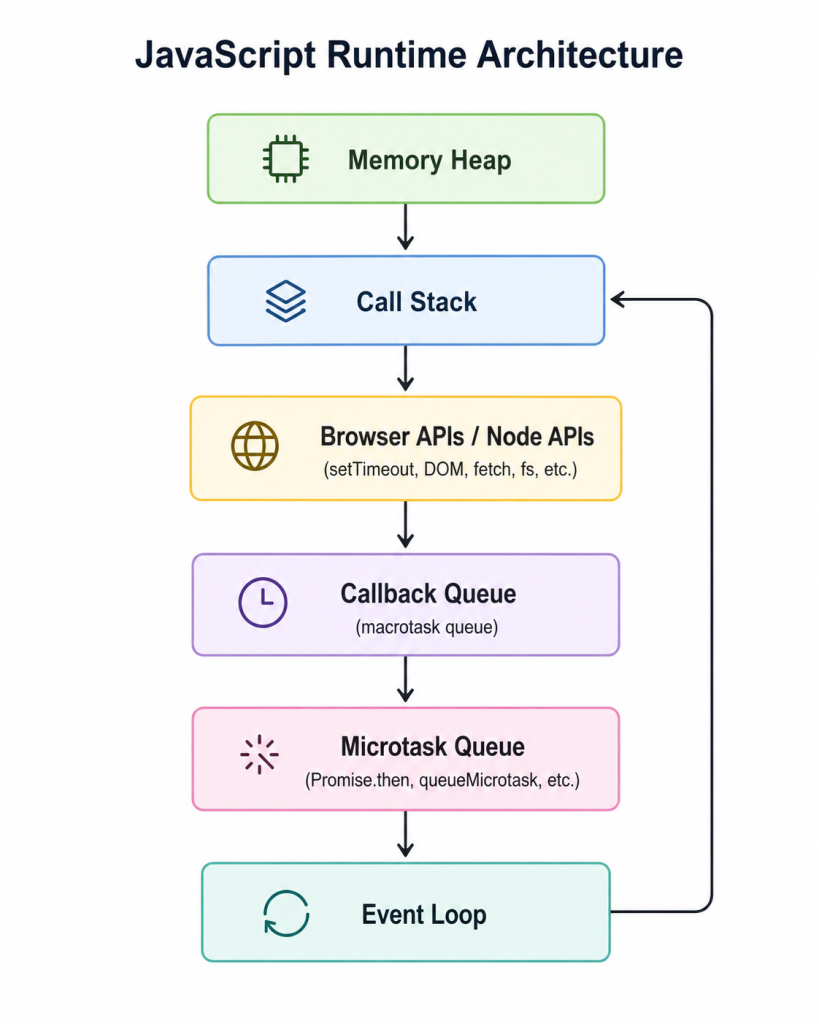
3. Runtime Architecture
JavaScript itself doesn’t provide timers, network requests, or DOM events.
Those capabilities come from the runtime environment.
A JavaScript runtime consists of:
- Memory Heap
- Call Stack
- Browser APIs or Node APIs
- Callback Queue
- Microtask Queue
- Event Loop
4. Execution Context
Every JavaScript program runs inside an execution context.
There are two major types:
Global Execution Context
Created when the application starts.
Function Execution Context
Created whenever a function is invoked.
Example:
function greet() {
  console.log("Hello");
}

greet();
Execution:
Global Context
     ↓
greet()
After completion:
Global ContextExecution contexts are pushed onto the call stack and removed once execution finishes.
5. Call Stack
The call stack keeps track of function execution.
It follows the Last-In-First-Out (LIFO) principle.
Example:
function first() {
  second();
}

function second() {
  third();
}

function third() {
  console.log("Done");
}

first();
Step 1
Global
Step 2
Global
first()
Step 3
Global
first()
second()
Step 4
Global
first()
second()
third()
Step 5
Global
The last function added is always removed first.
6. Why Event Loop Exists
Imagine JavaScript had to wait for every network request to finish.
Example:
fetch("/users");If JavaScript paused until the server responded, the entire page would freeze.
The event loop solves this problem by allowing JavaScript to delegate long-running operations and continue executing other code.
This behavior is known as non-blocking I/O.
7. Browser APIs
Features like:
- setTimeout()
- setInterval()
- Fetch API
- DOM events
- Event listeners
are provided by the browser, not the V8 engine.
Example:
setTimeout(() => {
  console.log("Hello");
}, 2000);
The browser handles the timer independently while JavaScript continues executing.
8. Callback Queue
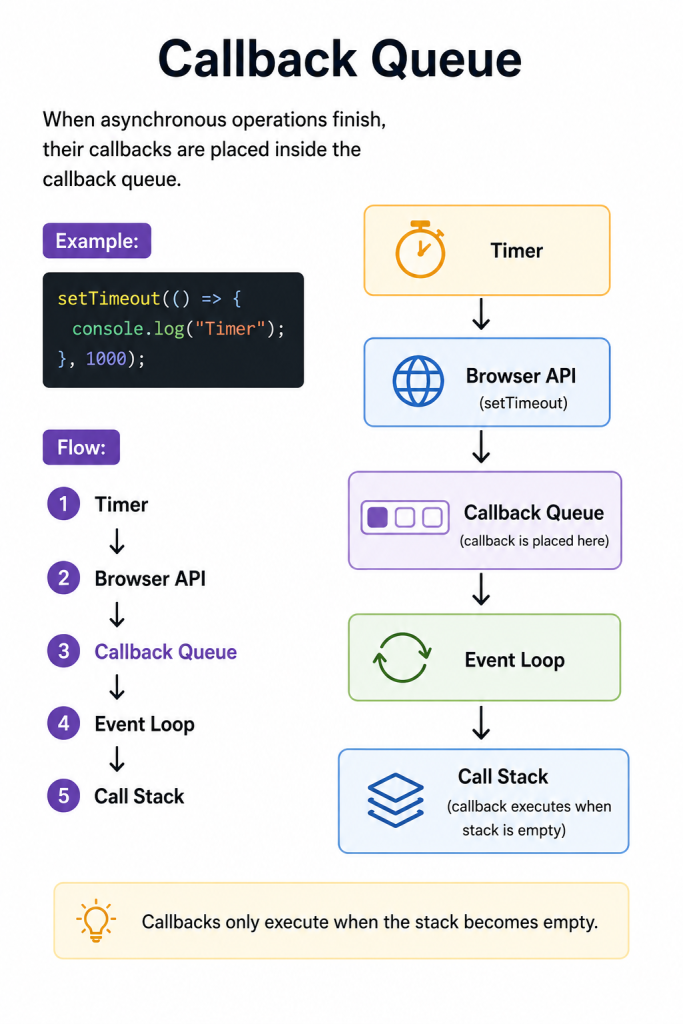
Callbacks only execute when the stack becomes empty.
9. Microtask Queue
Microtasks have higher priority than normal callbacks.
Microtasks include:
- Promise.then()
- catch()
- finally()
- queueMicrotask()
Example:
Promise.resolve()
.then(() => {
  console.log("Promise");
});
These callbacks are stored inside the microtask queue.
10. Macrotask vs Microtask
JavaScript maintains two different queues.
| Macrotask | Microtask |
| setTimeout | Promise.then |
| setInterval | catch |
| DOM events | finally |
| MessageChannel | queueMicrotask |
Priority:
Call Stack
↓
Microtask Queue
↓
Rendering
↓
Macrotask Queue
Microtasks always run before macrotasks.
11. Promises
Promises represent future values.
States:
Pending
↓
Fulfilled
↓
Rejected
Example:
Promise.resolve()
.then(() => {
  console.log("First");
});
After resolution, the callback enters the microtask queue.
12. Async/Await
Async/await is built on top of promises.
Example:
async function run() {

  console.log("A");

  await Promise.resolve();

  console.log("B");

}

run();

console.log("C");
Output:
A
C
B
When JavaScript encounters await, execution pauses and the remaining code resumes later through the microtask queue.
13. setTimeout()
Many developers assume:
setTimeout(fn, 0);means immediate execution.
It doesn’t.
It means:
Execute after at least zero milliseconds and only when the call stack becomes empty.
Example:
console.log("Start");

setTimeout(() => {
  console.log("Timer");
},0);

console.log("End");
Output:
Start
End
Timer
14. Practical Examples
Promise + Timer
console.log(1);

setTimeout(() => {
  console.log(2);
},0);

Promise.resolve()
.then(() => {
  console.log(3);
});

console.log(4);
Output:
1
4
3
2
Promises execute before timers because microtasks have higher priority.
15. Node.js Event Loop
Node.js uses libuv and divides execution into phases:
Timers
↓
Pending Callbacks
↓
Idle
↓
Poll
↓
Check
↓
Close Callbacks
Each phase handles different categories of tasks.
16. Callback Hell
Older asynchronous code often looked like this:
login(function() {

  getUser(function() {

    getPosts(function() {

      getComments(function() {

      });

    });

  });

});
Problems:
- Difficult to read
- Hard to debug
- Poor maintainability
Promises and async/await solve these issues.
17. Common Mistakes
Some common mistakes include:
Blocking loops
while(true) {}
Heavy CPU computations
for(let i = 0; i < 1000000000; i++) {}
Infinite microtasks
function loop() {

  Promise.resolve().then(loop);

}

loop();
Assuming setTimeout(0) runs immediately
It doesn’t.
18. Advanced Concepts
Advanced topics include:
- Starvation
- Queue prioritization
- Rendering cycle
- Performance impact
- Event loop scheduling
Understanding these topics helps optimize applications and avoid UI freezes.
19. Real-World Examples
The event loop powers many everyday features:
API calls
await fetch(“/users”);
Search suggestions
input.addEventListener(“input”, search);
Chat applications
WebSockets deliver messages asynchronously.
Infinite scrolling
Content loads without blocking the page.
Loading states
showLoader();
await fetchData();
hideLoader();
20. Summary
The event loop is the heart of asynchronous JavaScript.
Mental model:
Execute synchronous code
↓
Delegate async tasks
↓
Continue execution
↓
Empty the call stack
↓
Execute all microtasks
↓
Render the UI
↓
Execute one macrotask
↓
Repeat forever
Remember these key ideas:
- JavaScript is single-threaded.
- The runtime environment provides asynchronous capabilities.
- Promises use the microtask queue.
- Timers use the callback queue.
- Microtasks run before macrotasks.
- async/await is built on top of promises.
- The event loop keeps everything coordinated.