” Building software without security is like building a house without wiring for electricity. You can try to add it later, but it will be messy, expensive, and never quite right.”
In 2023, the average cost of a data breach hit $4.45 million. Companies lost customer trust overnight. Engineering teams scrambled through nights fixing vulnerabilities that should never have existed. The culprit? Treating security as a checkbox rather than a foundation.
Welcome to the era of self-defending software—where Risk Analysis, Security, and Compliance aren’t separate concerns but an integrated immune system protecting your applications 24/7.
Why Your Current Approach Is Failing
Let’s be honest about traditional security:
- Security audits once a quarter → Means vulnerabilities live rent-free in your system for 89 days on average.
- Manual compliance checks → Opens the door to human error, a factor in 95% of all breaches.
- Reactive incident response → The “bury your head in the sand” approach, with an average breach detection time of 207 days.
- Siloed security teams → A game of broken telephone, where 60% of breaches now involve third-party software.
The reality? Modern cyberattacks move at machine speed. If your defenses are still manual, you’re bringing a knife to a drone fight.
The Three Pillars
The goal isn’t just to build a strong door; it’s to create a dynamic ecosystem of defense. This is where the timeless CIA Triad—Confidentiality, Integrity, and Availability—meets modern, automated tooling in a DevSecOps culture. Every pillar we build reinforces this triad.
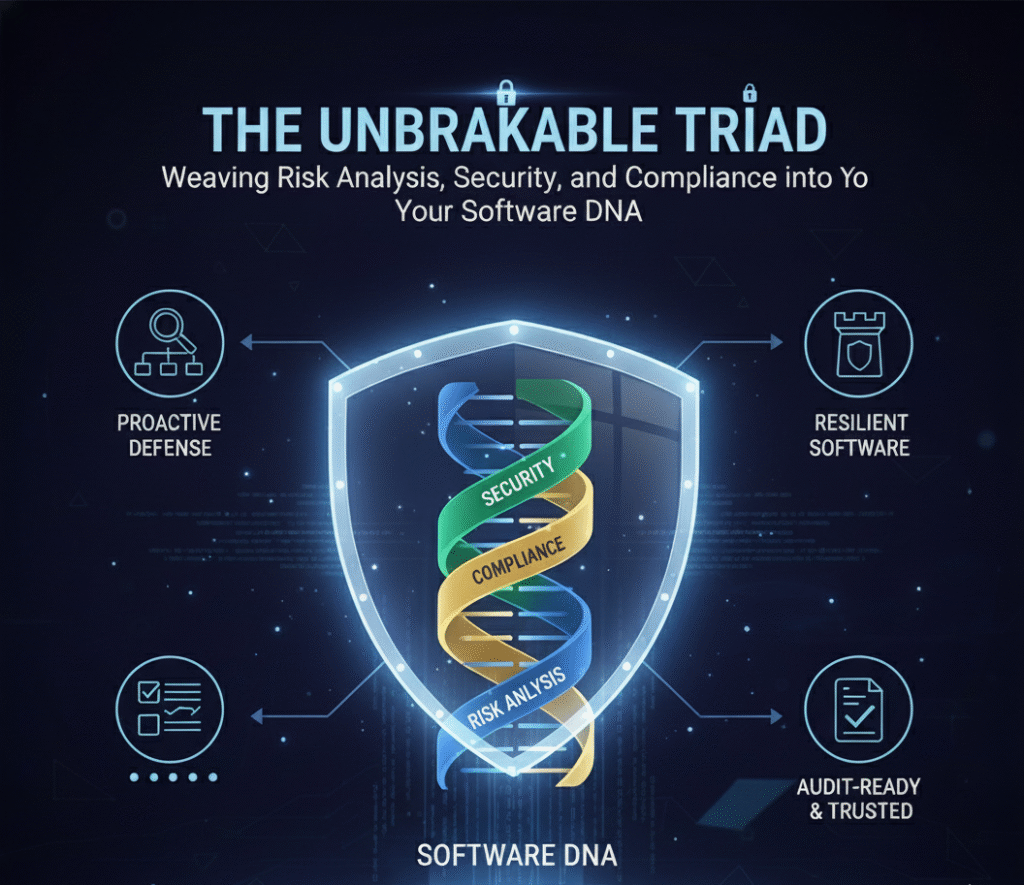
Pillar 1: Risk Analysis – Your Early Warning System

Most teams discover vulnerabilities after deployment. By then, hackers may have already found them. This is about creating a centralized nervous system that feels every pulse, heartbeat, and anomaly within your application in real-time, a core tenet of a Secure SDLC (SSDLC).
The Problem: Most teams play a cruel game of whack-a-mole, discovering critical vulnerabilities after they’ve been deployed. By then, they’re not vulnerabilities—they’re open doors.
The Solution: Continuous, Automated Threat Detection
Real-time Runtime Monitoring with Falco: The Bodyguard for Your Kernel. Picture this: It’s 2 AM. An attacker exploits a zero-day vulnerability in your web framework. Their first move? Trying to read your .env file to steal database credentials.
- Traditional Security? You discover this breach 6 months later during a forensic audit.
- With Falco? You get an alert within milliseconds.
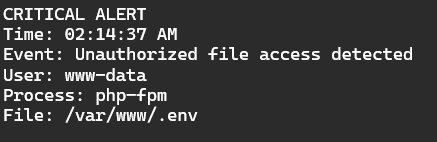
Your security team is paged and responds before a single byte of data is exfiltrated.
- How it works: Falco monitors kernel-level system calls—the deepest, most fundamental level of your operating system.
- What it detects: Anomalous behavior like, “Why is a web server process suddenly trying to read SSH keys?”
- The magic: It does all this with zero performance impact, thanks to eBPF technology.
Code-Level Protection with SonarQube: The Spell-Check for Security. Every developer makes mistakes. The question is: do you catch them before attackers do?
What SonarQube catches that you might miss:
Before:
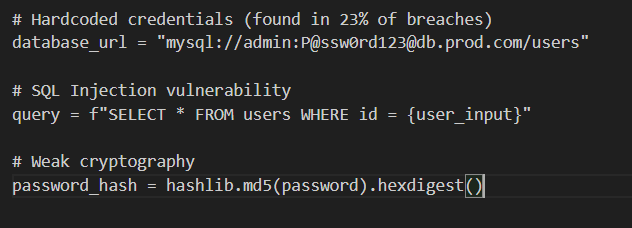
After SonarQube:
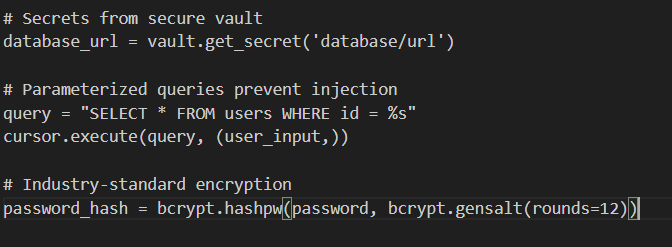
It acts as an automated quality gate in your CI/CD pipeline:
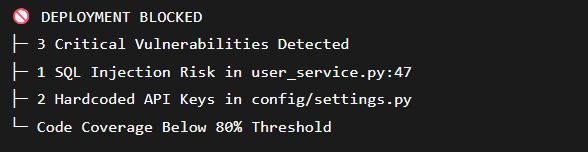
Supply Chain Security with Trivy & Snyk: Vetting Every Single Package
The hidden danger no one talks about? Up to 80% of your codebase is open-source dependencies. You trust them, but should you?
Real-World Nightmare: In 2021, the ua-parser-js npm package (with 9 million weekly downloads) was hijacked to mine cryptocurrency. For four hours, anyone who installed it got a side of crypto-mining malware.
Trivy acts as your automated security scanner for everything:


The automated response is the real hero:
- Trivy detects a critical vulnerability during CI/CD.
- Renovate Bot automatically creates a Pull Request with the security patch.
- Your test suite runs automatically.
- The PR auto-merges if all tests pass.
- Deployment continues, safe and sound.
You’ve patched a critical flaw without a single manual check.
Pillar 2: Security – The Multi-Layered Shield (The CIA Triad in Action)

This is Defense in Depth. We’re building concentric rings of security so if one layer is breached, the next one stops the attack. This is a direct application of the CIA Triad:
- Confidentiality: Ensuring data is only accessible to authorized users.
- Integrity: Safeguarding the accuracy and completeness of data.
- Availability: Guaranteeing systems and data are accessible when needed.
| Layer | Tool Example | Protects | CIA Focus |
| Edge | WAF/API Gateway | From external attacks | Availability, Integrity |
| Secrets | HashiCorp Vault | Your credentials & keys | Confidentiality,Integrity |
| Identity | Keycloak | Who can access what | Availability, Confidentiality |
| Network | Fail2Ban | From brute-force attacks | Availability ,Confidentiality |
| Dependencies | Renovate | From known vulnerabilities | Integrity,Availability |
If one layer fails, others catch the attack.
Secrets Management: The Zero-Trust Approach
The old way:

Why this is catastrophic:
- Git history is forever (even if you delete the file)
- One leaked .env file = total compromise
- Static secrets never expire
The Vault way:
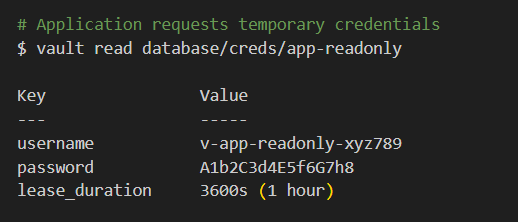
What just happened:
- Application authenticates with Vault (using certificate)
- Vault generates temporary database credentials valid for 1 hour
- After 1 hour, credentials automatically expire
- Even if stolen, attacker has 1-hour window (vs. forever)
Dynamic secrets = Game changer
- Credentials rotate every hour automatically
- Stolen credentials expire fast
- Complete audit trail of who accessed what
- Zero static secrets in your codebase
Identity Management: MFA + Smart Access Control
Traditional login:
Username: admin
Password: ••••••••
✅ Logged in
Modern zero-trust login with Keycloak:
- Step 1: Username + Password
- Step 2: MFA Code from Authenticator App
- Step 3: Checking device fingerprint…
- Step 4: Location: New York (usual)
- Step 5: Time: 10 AM EST (business hours)
- Step 6: Role: Admin → Requires additional approval
✅ Access granted with session timeout: 15 minutes
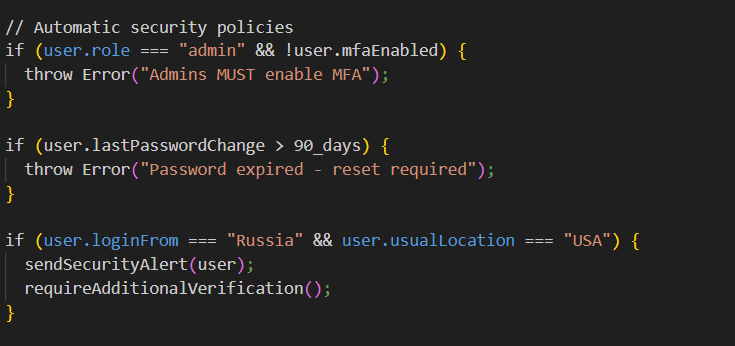
Conditional access rules:
Conditional access rules are dynamic security policies that grant or deny access based on multiple risk factors beyond just a password. Instead of a simple “yes/no” check, they evaluate: Who you are + What you’re accessing + Where you are + When you’re trying + How you’re connecting.
Network Protection: The Bouncer at the Door
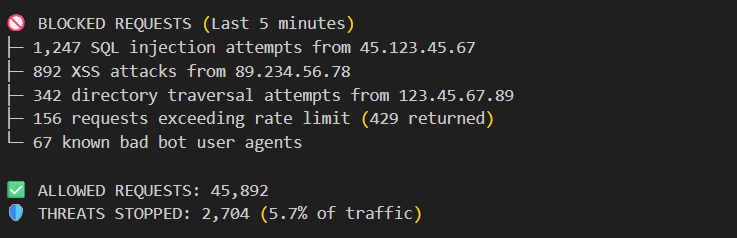
Web Application Firewall (WAF) in action:
A WAF acts as a protective filter between your web application and the internet, actively analyzing every request to block malicious traffic before it reaches your server.
Smart rate limiting:
Smart rate limiting is an advanced traffic management system that goes beyond simple request counting to dynamically control API and application access based on behavior, context, and risk assessment.
How It Works:
- Behavioral Analysis
- Tracks normal user patterns and session history
- Distinguishes between human and bot traffic
- Learns typical usage patterns for different user types
2. Multi-Factor Risk Scoring
- User Identity: Higher limits for authenticated users
- Request Context: Stricter limits on sensitive endpoints (/login, /payment)
- IP Reputation: Checks against known malicious IPs
- Geolocation: Flags unusual location patterns
- Time Patterns: Detects abnormal usage hours
3. Dynamic Response Engine
- Normal Traffic: Seamless access with generous limits
- Suspicious Activity: Progressive throttling and challenges
- Malicious Behavior: Immediate blocking and IP banning

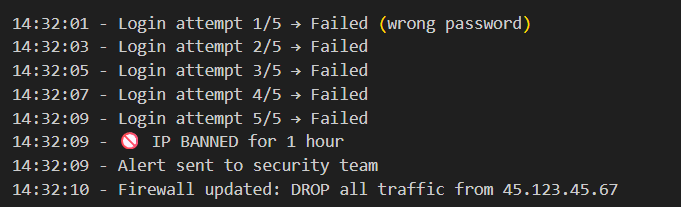
An attacker tries to brute-force login:
Fail2Ban stopped the attack in 8 seconds. It constantly monitors server logs for malicious activity like brute-force attacks. When it detects an attack pattern—such as multiple failed logins from one IP it automatically bans that IP at the firewall level. The result? Attacks are stopped within seconds, not hours, with zero human intervention required.
Automated Dependency Updates: Stay Ahead of Hackers
December 10, 2021: Log4Shell (CVE-2021-44228) is discovered. It’s the most critical vulnerability in a decade. Millions of applications are vulnerable.
Traditional team response:
- Discover vulnerability on Twitter (Day 1)
- Emergency meeting (Day 2)
- Identify affected systems (Days 3-5)
- Manually update dependencies (Days 6-10)
- Test and deploy (Days 11-14)
Time to patch: 14 days ← Attackers had a 2-week head start
With Renovate Bot:
December 10, 9:47 AM – CVE-2021-44228 added to vulnerability database
December 10, 9:52 AM – Renovate detects affected dependencies
December 10, 9:53 AM – PR created: “Update log4j to 2.15.0 (CRITICAL SECURITY)”
December 10, 10:05 AM – CI/CD tests pass
December 10, 10:07 AM – PR auto-merged
December 10, 10:15 AM – Deployed to production
Time to patch: 28 minutes.You were protected before most companies knew they were vulnerable.
Pillar 3: Compliance – Your Always-On Audit Trail (Stop the Scramble!)

The Compliance Crisis Nobody Talks About
Traditional compliance is broken: $500K annual audits, months of scrambling for evidence, and the second your audit ends, you’re non-compliant again. Modern enterprises need systems that are always audit-ready, self-healing, and automated.
Disaster Recovery: Your “Oops” Insurance Policy
Real nightmare: Junior dev runs DROP DATABASE production instead of test. Without backups? Bankruptcy. With proper DR? 15-minute recovery.
Enterprise Backup Strategy That Actually Works
- Continuous WAL streaming every 30 seconds
- Incremental backups every 5 minutes to encrypted S3
- Daily full snapshots to S3 + Glacier
- Weekly automated restore tests (the part everyone skips but you can’t afford to)
- Multi-region replicas across 3 geographic zones
Recovery targets: 5-minute data loss max (RPO), 15-minute full restoration (RTO).
The secret? Automated weekly restore verification—because untested backups are just expensive false confidence.
Policy-as-Code: Rules That Enforce Themselves
Manual security policies fail at 11 PM on Friday. Developers forget. Deadlines pressure. Shortcuts happen.
Solution: Open Policy Agent (OPA) blocks non-compliant deployments automatically.
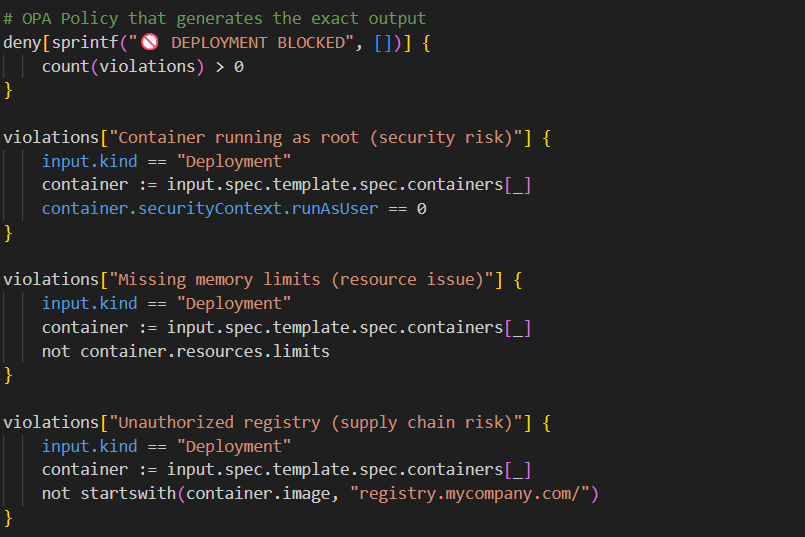
No meetings. No reminders. No human error. The system governs itself.
Complete Visibility: Your Security Control Tower
The iron law: You can’t protect what you can’t see.
Modern observability stack delivers instant answers:
- Prometheus + Grafana: Real-time metrics and alerts
- Loki: Centralized log search across all services
- Wazuh/SIEM: Security event correlation and threat intelligence
When Auditors Ask the Hard Questions
Traditional response: “Give us 2 weeks to compile that data.”
With proper observability: 2-second query reveals 1,247 access events, including that suspicious anomaly your team needs to investigate immediately.
The Continuous Protection Loop in Action
Zero-Day Vulnerability Response Timeline
T+0: Critical CVE detected in nginx
T+5: Renovate Bot auto-creates security patch PR
T+10: CI/CD validates fix with full test suite
T+12: Auto-merge and rolling deployment begins
T+18: Prometheus confirms zero vulnerable instances
T+20: Compliance logs updated with complete audit trail
T+30: Team notified—zero customer impact
Your involvement? Reviewing the automated fix over coffee. Without automation? Two-week fire drill, potential breach, damaged customer trust.
Real-World Impact: The Numbers That Matter
Security Metrics Transformation
Before:
- 47 annual security incidents
- 207-day average detection time
- 3 data breaches
- $500K compliance audit costs
- 8,240 developer hours on security
- Customer trust: 6.2/10
After:
- 3 incidents (94% reduction)
- 4.5-minute detection time (99.9% faster)
- 0 data breaches
- $50K audit costs (90% reduction)
- 420 developer hours (95% reduction)
- Customer trust: 9.1/10
Financial Impact Analysis
Annual Costs Eliminated:
- Breach Cost Elimination
Previous: 3 breaches × $800,000 average cost per breach = $2,400,000
New: 0 breaches
Savings: $2,400,000
- Emergency Response Cost Reduction
Previous: 47 incidents × $25,000/incident = $1,175,000
New: 3 incidents × $25,000/incident = $75,000
Savings: $1,100,000
- Compliance Audit Cost Reduction
Previous: $500,000
New: $50,000
Savings: $450,000
- Developer Productivity Recovery
Hours saved: 8,240 – 420 = 7,820 hours
Fully burdened developer cost: $100/hour
Value: 7,820 × $100 = $782,000
- Customer Churn Reduction
Assumptions: $20M annual revenue, 30% gross margin
15% churn reduction on 20% baseline churn
Value: $20M × 15% × 30% margin = $900,000
Total Annual Savings: $5,632,000
Investment:
- Security infrastructure & implementation: $340,000
- Training & change management: $60,000
- Total Investment: $400,000
Corrected Financial Results
ROI Calculation:
- Net Gain = Total Savings – Investment
- Net Gain = $5,632,000 – $400,000 = $5,232,000
- ROI = (Net Gain / Investment) × 100
- ROI = ($5,232,000 / $400,000) × 100 = 1,308%
Payback Period:
Payback Period = $400,000 / $469,333 = 0.85 months (~26 days)
Payback Period = Investment / Monthly Savings
Monthly Savings = $5,632,000 / 12 = $469,333