Real-time applications like WhatsApp, Slack, and Discord update messages instantly without refreshing the page. This is called real-time messaging.
In this tutorial, you will learn how to build a real time chat app ReactJS developers can use for learning and portfolio projects using:
- ReactJS
- Node.js
- Express
- WebSockets
- Pusher
What is a Real-Time Chat Application?
A real-time chat application allows users to send and receive messages instantly.
Examples:
- Slack
- Discord
- Messenger
Unlike traditional websites, users do not need to refresh the page manually.
What are WebSockets?
WebSockets create a permanent connection between the client and server.
HTTP Request
Client → Request → Server
Client ← Response ← Server
WebSocket Connection
Client ↔ Server
The connection stays open, allowing instant communication.
HTTP Long Polling vs WebSockets
| Feature | Long Polling | WebSockets |
| Connection | Multiple Requests | Persistent Connection |
| Speed | Slower | Faster |
| Real-Time Support | Limited | Excellent |
| Server Load | High | Low |
WebSockets are better for building a react websocket chat app.
What is Pusher?
Pusher is a real-time communication platform that helps developers build chat applications quickly.
Pusher manages:
- Real-time connections
- Event broadcasting
- Scaling
- WebSocket infrastructure
This makes pusher real time chat development easier.
Why Use React for Chat Applications?
React is perfect for chat apps because of:
- Fast UI updates
- Reusable components
- Real-time rendering
- Easy state management
This is why developers use React for:
- real time chat React
- react websocket tutorial
- build messaging app React
Project Architecture
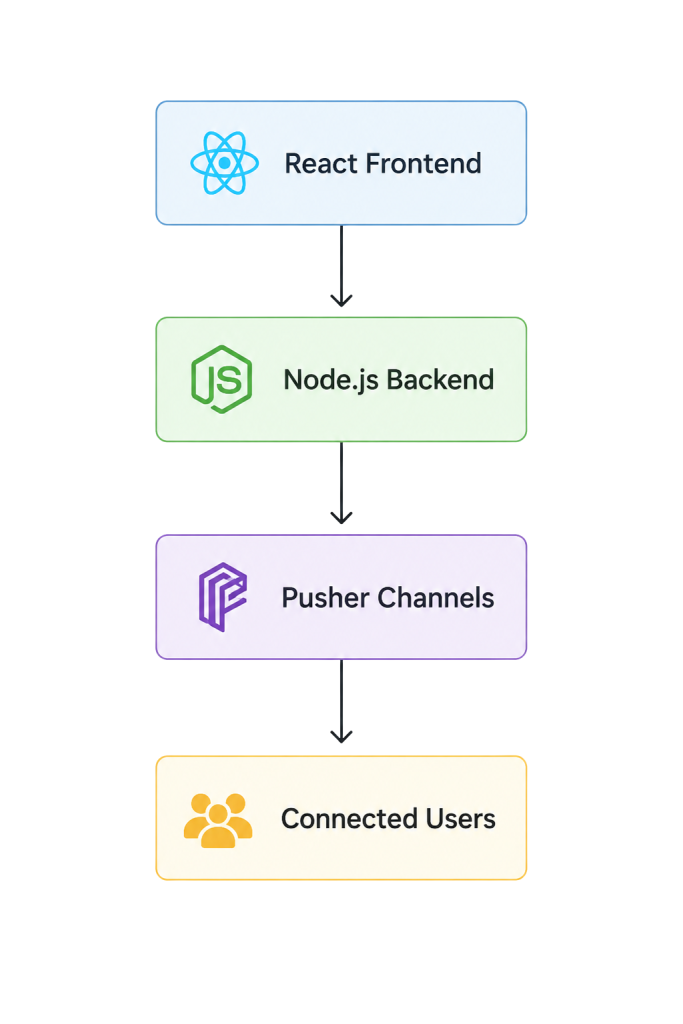
Features We Will Build
- Real-time messaging
- Live updates
- Typing indicators
- Auto-scroll
- Responsive UI
- Error handling
Tech Stack
| Technology | Purpose |
| ReactJS | Frontend |
| Node.js | Backend |
| Express | API Server |
| Pusher | Real-time messaging |
| Axios | HTTP Requests |
Step 1: Create React Project
npx create-react-app react-chat-app
Move into the project:
cd react-chat-app
Step 2: Install Dependencies
Frontend
npm install axios pusher-js
Backend
npm install express cors dotenv pusher
Step 3: Setup Pusher
Create an account on:
Create a Channels app and copy:
- App ID
- Key
- Secret
- Cluster
Step 4: Backend Server Setup
server.js
const express = require("express");

const cors = require("cors");

const Pusher = require("pusher");

const app = express();

app.use(cors());

app.use(express.json());

const pusher = new Pusher({

  appId: "YOUR_APP_ID",

  key: "YOUR_KEY",

  secret: "YOUR_SECRET",

  cluster: "ap2",

  useTLS: true,

});

app.post("/message", async (req, res) => {

  const { username, message } = req.body;

  await pusher.trigger("chat-channel", "new-message", {

    username,

    message,

  });

  res.json({ success: true });

});

app.listen(5000, () => {

  console.log("Server running on port 5000");

});
Step 5: React Chat App
App.jsx
import { useEffect, useState } from "react";

import Pusher from "pusher-js";

import axios from "axios";

function App() {

  const [messages, setMessages] = useState([]);

  const [message, setMessage] = useState("");

  useEffect(() => {

    const pusher = new Pusher("YOUR_KEY", {

      cluster: "ap2",

    });

    const channel = pusher.subscribe("chat-channel");

    channel.bind("new-message", (data) => {

      setMessages((prev) => [...prev, data]);

    });

    return () => {

      channel.unbind_all();

      channel.unsubscribe();

    };

  }, []);

  const sendMessage = async () => {

    if (!message.trim()) return;

    await axios.post("http://localhost:5000/message", {

      username: "Sachin",

      message,

    });

    setMessage("");

  };

  return (

    <div>

      <h1>React Chat App</h1>

      {messages.map((msg, index) => (

        <div key={index}>

          <strong>{msg.username}</strong>

          <p>{msg.message}</p>

        </div>

      ))}

      <input

        value={message}

        onChange={(e) => setMessage(e.target.value)}

        placeholder="Type message..."

      />

      <button onClick={sendMessage}>

        Send

      </button>

    </div>

  );

}
export default App;
How Real-Time Messaging Works
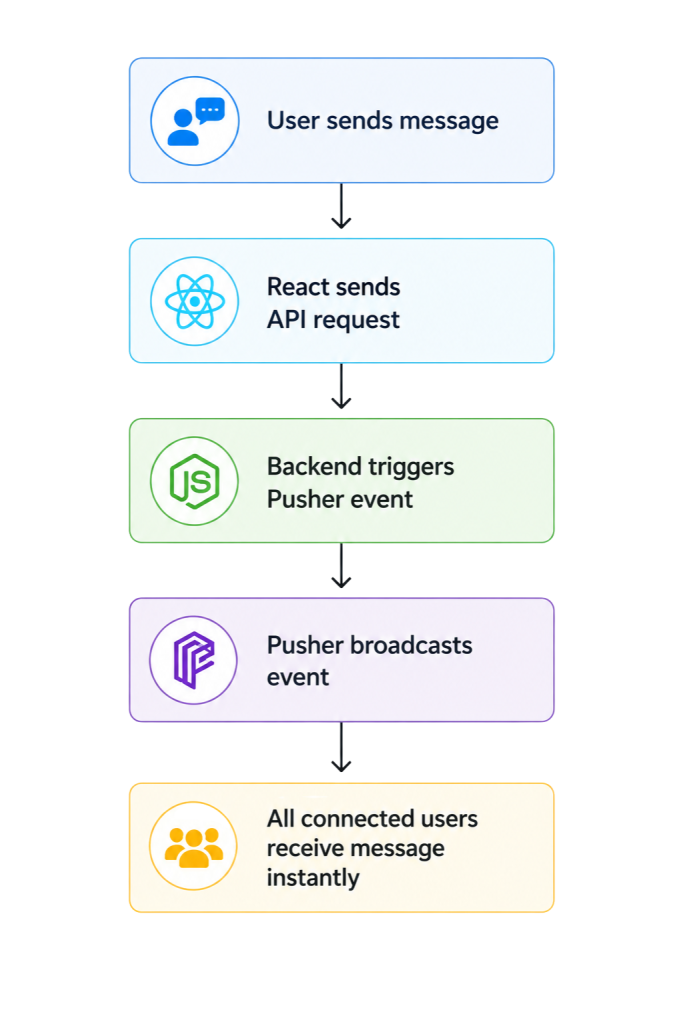
Socket.IO vs Pusher
| Feature | Socket.IO | Pusher |
| Setup | Medium | Easy |
| Hosting | Self-managed | Managed |
| Scaling | Manual | Automatic |
If you want to quickly learn how to build real-time chat with Pusher and React, Pusher is a great choice.
Best Practices
Cleanup WebSocket Listeners
return () => {

  channel.unbind_all();

};
Use Environment Variables
Never expose secrets in frontend code.
Add Error Handling
{

  await axios.post(...);

} catch (error) {

  console.log(error);

}
Common Mistakes
- Forgetting cleanup functions
- Exposing API keys
- Duplicate event listeners
- No error handling
- Too many re-renders
Interview Questions
What are WebSockets?
WebSockets provide persistent bidirectional communication between client and server.
Difference Between HTTP and WebSocket?
HTTP is request-response.
WebSocket provides real-time communication.
What is Pub/Sub?
Publishers send events and subscribers receive them instantly.
Final Folder Structure
src/
├── components/
├── services/
├── hooks/
├── App.jsx
└── main.jsx